A phone camera is very good at taking pictures in good light and much less good in poor light. Most of the difference between a muddy, grainy video and a clear one is not the phone at all. It is how much light falls on the person in front of it, which way that light comes from, and what colour it is. This guide explains the lights people use for filming on a phone, from ring lights to small clip-on lights, what the numbers on them mean, why sound matters as much as the picture, and how to set up for a video call, a selfie or a longer piece of filming.
Why light matters more than the camera
A camera records light. When there is plenty of it, the sensor has an easy job: it takes a short exposure, keeps the detail sharp and the colours clean. When there is not enough, the phone has to work harder. It raises the sensitivity of the sensor, which brings grain and smearing into the picture, slows the exposure, which blurs anything that moves, and leans on its own software to brighten the shadows, which can leave faces looking flat and waxy. Phones have become very clever at hiding all of this, but they cannot add light that was never there.
That is why the same phone can take a lovely photo by a window on a bright morning and a poor one in the corner of a sitting room at night. The camera has not changed. The light has.
Three things to think about
- How much light. Enough to let the phone use a fast, clean exposure. Indoors at night, a ceiling bulb is rarely enough on its own for a face.
- Where it comes from. Light from in front of the face, a little above eye level, flatters most people. Light from directly overhead puts shadows under the eyes, and light from behind turns a person into a dark shape against a bright background.
- How soft it is. A large light close to the face gives soft, gentle shadows. A small, bare light gives hard shadows with sharp edges. This is why ring lights and panels with a diffuser are so popular: they spread the light out.
A good light is often the cheapest single improvement you can make to phone video, and it helps every app on the phone at once, from video calls to the camera itself.
Ring lights: sizes and stands
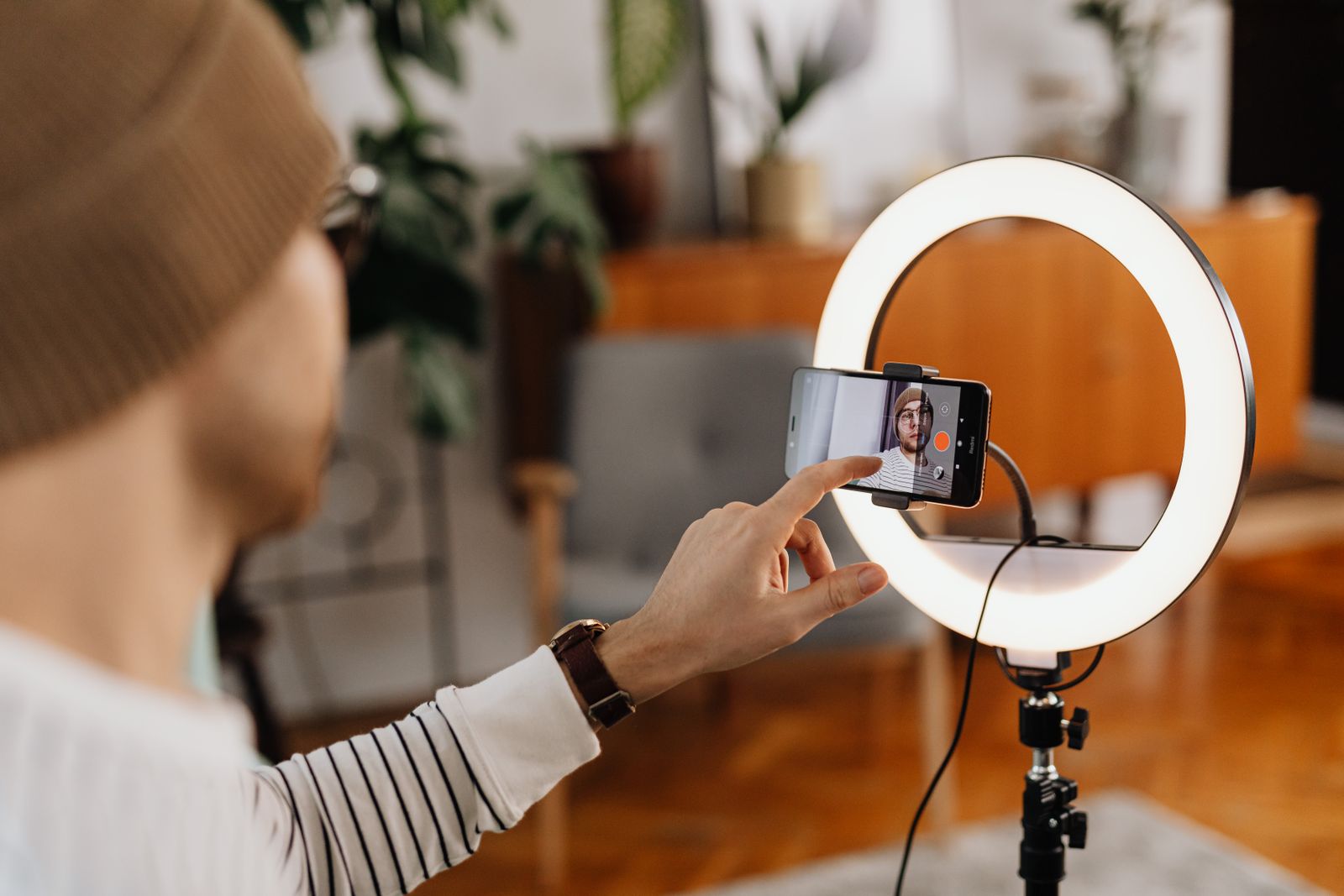
A ring light is a circle of small LEDs behind a frosted cover, with a space in the middle. The phone usually sits in a holder in that space, so the light comes from all around the lens at once. Because the light surrounds the camera, it fills in the shadows on a face evenly and leaves a small round reflection in each eye, which many people like. That even, shadow-free look is why ring lights became the standard kit for make-up tutorials, selfies and talking to camera.
Sizes
Ring lights are sold by the width of the ring, usually given in inches across. The size changes what the light is good for:
- Small rings sit on a desk or clip to the top of a laptop. They light one face at close range and suit video calls, live streams from a desk and close-up selfies.
- Medium rings on a stand light a face and shoulders from a little further back, and give softer light because the ring is larger.
- Large rings on a floor stand light more of a person, from further away, and suit full-length outfit videos and filming in a bigger room.
A larger ring gives softer light at the same distance, but it also needs a steadier stand and takes up more room. For one face at a desk, a small or medium ring is usually plenty.
Stands and holders
Desk ring lights come on short, adjustable legs or a clamp. Floor ring lights come on a tall stand, often with a phone holder on a bendy arm, so the phone can sit in the middle of the ring or just beside it. Look at the range of height the stand gives, because you want the light and the camera at about eye level when you are standing or sitting, whichever you will do most. A stand with a wide base is less likely to tip over when the ring is raised high. See ring lights, or tall tripods if you already have a light and only need something to hold the phone at head height.
Power
Most ring lights run from a USB plug, so they need a USB charger with a UK plug or a laptop's port. Some have a battery built in. A USB-powered ring light can also run from a power bank when you film away from a socket; the guide to power banks explains how much charge you really get from one.
LED video lights
An LED video light is a small, flat panel of LEDs, often about the size of a phone or a little bigger. Unlike a ring light, it sits to one side of the camera, which gives a face some shape: one side a little brighter than the other, the way light from a window falls. Many people use one panel as their main light and a second, dimmer one on the other side to soften the shadows.
What they are good for
- Talking to camera when you want a more natural, less flat look than a ring light gives.
- Lighting objects: food, crafts, products for selling online. A panel on each side, at an angle, shows texture without hard shadows.
- Filming on the move, because the small ones run from a built-in battery and fit in a pocket.
Most small panels have a standard screw thread underneath, so they fit on a mini tripod, a light stand or the shoe on a phone rig. Many also have a diffuser that clips over the front to soften them further. Battery panels charge from USB-C, and the larger ones can often run while plugged into a power bank. See LED video lights.
Light falls off quickly with distance
A light that looks bright at arm's length gets dim fast as you move it away. Move a light twice as far from your face and you get only about a quarter of the light on it. So a small panel works well close in and struggles across a room. If a picture looks dull, moving the light nearer helps more than turning it up.
Clip-on selfie lights and phone flashes
The smallest lights clip straight onto the phone. A clip-on selfie light is a little ring or bar of LEDs on a spring clip that grips the top edge of the phone, pointing the same way as the front camera. It is made for selfies and video calls in dim places: a restaurant, a car park at night, a hotel room. They are light enough to keep in a bag and usually charge by USB-C. Because the light is so close to the lens, it lights a face evenly from the front, rather like a tiny ring light. See clip-on selfie lights.
A phone's own flash is a tiny, very bright point of light right beside the lens. It freezes movement but gives harsh, flat light, red eyes and a dark background, and the front camera on many phones has no flash at all, only a brightened screen. A separate clip-on flash or fill light is larger and softer, and can be set to stay on as a constant light for video rather than firing once. Some can be moved off the phone and held to one side for a more natural look. See phone flashes.
Clip-on lights are about getting a usable picture where there was none. For anything you film often at home, a ring light or a panel on a stand gives better light because it can be larger and further from the lens.
Colour temperature and brightness
Two settings appear on almost every phone light: how warm or cool the light is, and how bright. Knowing what they mean saves a lot of fiddling.
Colour temperature, in kelvin
White light is not all the same colour. Old-fashioned bulbs and candles give a warm, orange-tinted white. Daylight at midday is a cooler, bluer white. The colour is measured in kelvin, written K. Lower numbers are warmer and higher numbers are cooler. As a rough guide used in film and video:
| Colour temperature | What it looks like |
|---|---|
| Around 3,000 to 3,200K | Warm white, like a household bulb in the evening |
| Around 4,000 to 4,500K | Neutral white, between the two |
| Around 5,500 to 5,600K | Daylight white, like the sun in mid-morning or mid-afternoon |
| Higher | Cool, bluish white, like an overcast sky or shade |
Many ring lights and panels let you move between warm and cool, either in a few steps or smoothly. The trick is to match the light you add to the light already in the room. If you sit by a window in daytime, set your light near daylight. If the room is lit by warm bulbs in the evening, a warmer setting blends in. When two very different colours fall on one face, one side looks orange and the other blue, and the phone's camera cannot correct both at once. If in doubt, turn off the other lights in the room and let your light do the work.
Colour accuracy
Some lights give a figure called CRI, the colour rendering index. It is a score for how truly a light shows colours compared with natural light, out of 100. A higher figure means skin tones and clothes look more like themselves; 90 or more is the figure usually looked for in lights for video. It is one guide among several, not a promise, but a light that gives no figure at all tells you less than one that does.
Brightness
Brightness is usually set with a button or a dial in steps or as a percentage. More is not always better. A light turned right up close to the face makes people squint, shines on skin and glasses, and can wash out detail. Start low, raise it until the face looks clear on the phone's screen, and stop there. On many lights, the highest settings also run the battery down fastest and make the light warm to the touch.
Glasses
If you wear glasses, a light straight in front of you will show as a reflection in the lenses. Raising the light a little higher and moving it slightly to one side usually moves the reflection out of the shot. With a ring light, the reflection is a circle; tilting the ring down a touch can help.
Sound: wireless microphones
People will watch a video with a so-so picture, but they will click away from one they cannot hear. A phone's built-in microphone is made to pick up a voice close to the phone. Step back a couple of metres, film outdoors in a breeze, or record in a room with bare walls, and it picks up the room as much as the voice: echo, traffic, the fridge, the wind.
A wireless microphone puts the microphone where the voice is. A small transmitter clips onto clothing near the chin, and a receiver plugs into the phone and sends the sound straight into the video. Because the microphone is a hand's width from the mouth, the voice is loud and clear and the room is quiet by comparison. See wireless microphones.
What to look for
- The plug on the receiver. It has to match the phone: USB-C for most recent phones, including iPhone 15 and later, or Lightning for iPhone 14 and earlier. Some kits come with both, or with a 3.5mm lead for a camera. The guide to charging cables explains which phones use which plug.
- One microphone or two. Two transmitters to one receiver let you film an interview or two people talking.
- Charging. A receiver in the phone's only port blocks the charger. Some receivers let a cable plug into them so the phone charges while you record. Many kits come in a charging case that tops up the microphones between takes.
- Noise reduction. A switch that turns down steady background noise such as traffic or a fan. Useful outdoors, but it can make a voice sound slightly thin, so try it both ways.
- A windshield. A small furry cover over the microphone that stops wind rumbling across it outdoors.
Frequencies
Most phone microphone kits send sound on the 2.4GHz band, the same band used by Wi-Fi and Bluetooth. Ofcom, which looks after radio in the UK, lets people use that band for this kind of equipment without a licence. Professional radio microphones bought from abroad on other frequencies are a different matter and may not be legal to use here, so the plug-in phone kits are the simple choice.
Choosing it in the app
Some camera apps pick up a plugged-in microphone straight away. Others need you to choose it in the app's own settings. Record a few seconds and play them back with earphones before you film anything that matters.
Setting up for video calls, selfies and filming
The kit only helps if it is set up well. These set-ups cover most of what people film on a phone.
Video calls at a desk
- Put the phone at eye level, not on the desk looking up at you. An adjustable phone stand or a pile of books does it.
- Face the window if you can, so daylight falls on your face. Never sit with a bright window behind you; the camera will turn you into a silhouette.
- Add a small ring light or a panel just behind the phone, a little above eye level. Set it to roughly match the daylight in the room.
- Turn the brightness up only until your face looks clear on screen.
- For important calls, wear wired or wireless earphones with a microphone, so the other person does not hear their own voice echoing back from your speaker.
Selfies and short videos
- Use the main rear camera if you can; it is usually better than the front one. A remote shutter lets you take the picture from where you stand.
- Put the phone in the middle of a ring light, or a panel just beside the lens, at eye level or slightly above.
- Keep the background a little darker than your face, so the eye goes to you.
- Take a test shot and look at it full size before you carry on.
Longer filming
- Fix the phone so it cannot move: a phone tripod, ideally one of the tripods with a remote so you can start and stop without touching it. The guide to tripods, gimbals and selfie sticks explains the choices.
- Use one main light at an angle to one side of your face, and a dimmer light or a white wall on the other side to soften the shadows.
- Clip a wireless microphone to your clothing, a hand's width below the chin.
- Plug the phone into power or a power bank, put it on do not disturb, and check it has enough free storage.
- For a steadier set-up with everything attached, a phone rig or cage holds the phone, a light and a microphone on one frame with handles.
If you want different looks in the picture itself, such as a wider view or close-ups of small things, the guide to clip-on lenses and filters covers what can be added in front of the camera. Everything for filming on a phone is gathered in one place under for creators.
Questions people ask
Do I need a ring light for video calls?
Not if you can sit facing a window in daylight. A small ring light or panel helps a great deal in the evening, in a room with only a ceiling light, or when the window is behind you.
Why does my face look orange on one side and blue on the other?
Two lights of different colour temperatures are falling on you, usually a warm bulb and daylight from a window. Set your light to match one of them, or turn the other one off.
Ring light or LED panel?
A ring light gives even, shadow-free light straight on, which suits make-up, selfies and talking to camera. A panel to one side gives a face more shape and suits a more natural look, objects and filming on the move. Many people end up with one of each.
Will a wireless microphone work with my phone?
It will if the receiver's plug matches your phone's port, USB-C or Lightning, and your camera app accepts an outside microphone. Check the plug before you choose, and test a short recording first.
Can a ring light run from a power bank?
Most USB-powered ring lights and many panels can. Check that the light runs from USB and that the power bank gives enough power for it; a light that flickers or dims on a power bank needs a stronger one.
Where to go next
Start with the light you will use most: ring lights for the desk and talking to camera, LED video lights for a natural look and filming on the move, or clip-on selfie lights for the bag. Add a wireless microphone when you start to film further from the phone. Delivery is included in every price and tracked to your door.